
Developer Tools & CLI

Your Terminal Wants a Promotion

Multi-agent is table stakes, the CLI is the new IDE, and your terminal just became the command center for an army of AI coders.

Listen
A glowing terminal window floating in a dark command center, with holographic code streaming upward and smaller terminal windows orbiting like satellites
Abstract visualization of code review as an intelligent neural process examining glowing code
01

Code Review Just Got a Brain Transplant

Here's what code review used to look like: a glorified linter with a language model bolted on. It would scan your diff, flag some style nits, maybe catch an obvious null check. Useful? Sure. Transformative? Not remotely.

GitHub just changed the equation. Copilot code review now runs on an agentic architecture -- meaning instead of just reading your diff in isolation, it actively gathers context. It pulls in relevant files, maps directory structure, traces references across your codebase. The AI reviewer now understands how your change fits into the bigger picture, not just whether your semicolons are in the right place.

The numbers tell the story: an 8.1% jump in positive feedback from reviewers, averaging 5.1 comments per review. That second number is the interesting one -- it's not flooding you with noise. It's prioritizing correctness and architectural integrity over volume. The whole thing runs on GitHub Actions infrastructure, available to all Copilot Pro, Business, and Enterprise subscribers.

This is the pattern to watch: agentic tool-calling applied to traditionally static workflows. Review, testing, deployment -- every step in the pipeline is about to get this treatment. The question isn't whether your code review will be AI-powered. It's whether the AI will understand your architecture well enough to catch the bugs that matter.

A rapid-fire conveyor belt of glowing software releases moving at high speed through a pipeline
02

Claude Code Ships Like It's Running from Something

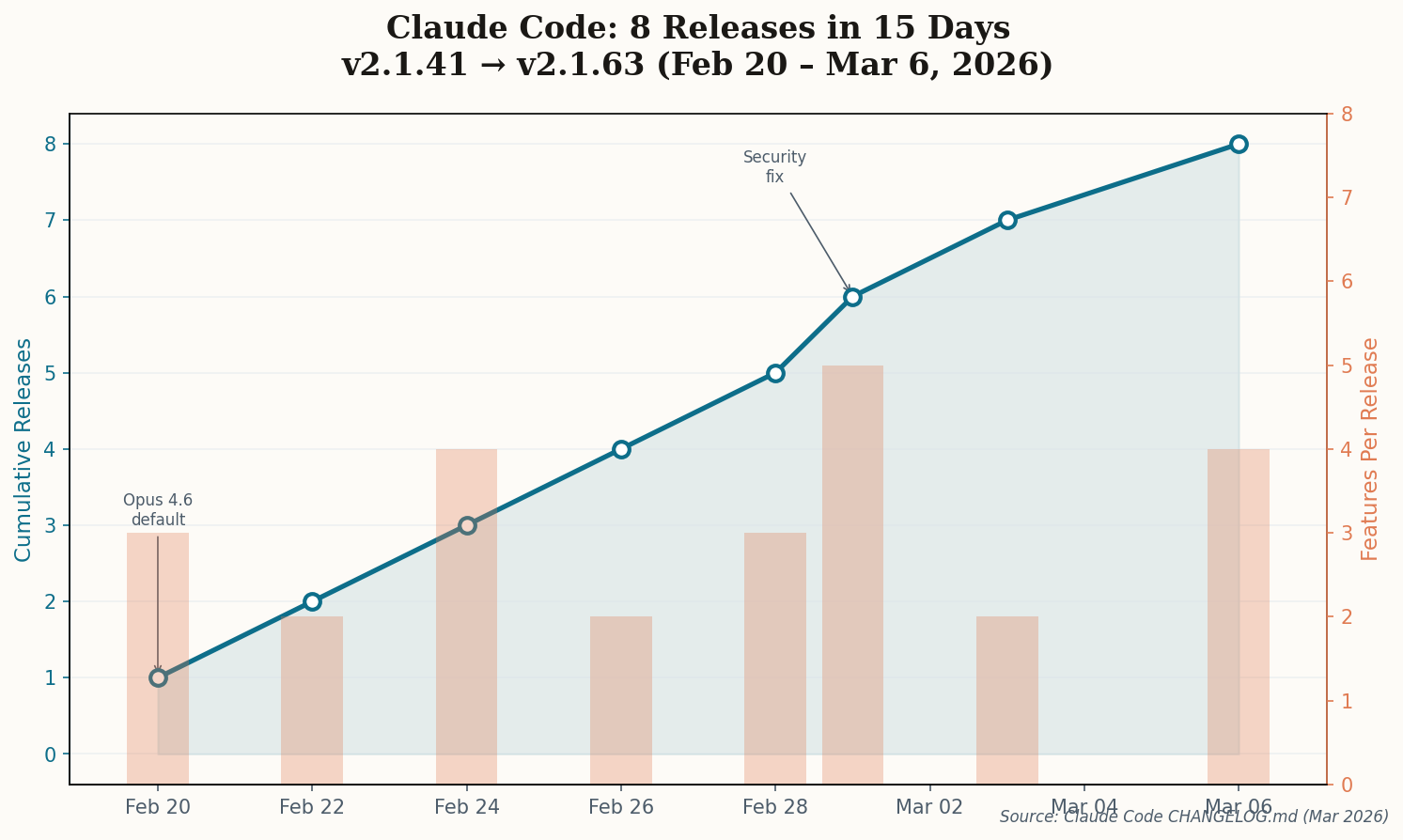
Eight releases in fifteen days. Let that sink in. Anthropic's Claude Code pushed versions 2.1.41 through 2.1.63 between February 20 and March 6, and the cadence tells you everything about how seriously they're treating this as a platform, not a side project.

Line chart showing Claude Code's cumulative releases accelerating from February 20 to March 6, 2026, with 8 releases in 15 days
Claude Code release cadence: 8 versions in 15 days, each shipping multiple features. The platform velocity is more reminiscent of a startup than a large AI lab.

The headline features: Opus 4.6 now defaults to medium effort for Max and Team subscribers, with the "ultrathink" keyword available for high-effort reasoning on demand. Voice STT expanded to 20 languages. A new /claude-api skill for building applications with the Anthropic SDK. And critically, a security fix for a symlink bypass that could escape the working directory -- the kind of thing that matters when enterprises are evaluating whether to let AI agents touch production code.

But the real signal isn't any single feature. It's the velocity. Anthropic removed Opus 4 and 4.1 entirely -- if you were on the first-party API, you got auto-migrated to 4.6. No deprecation warnings, no sunset period. Just: here's the new thing, the old thing is gone. That's a company betting hard on the terminal as a first-class development surface.

Fifteen days. Eight releases. If you're building tooling around Claude Code, you'd better be watching that changelog like a hawk.

Multiple glowing terminal windows in constellation pattern, connected by pulsing data streams
03

The Two-Week Window That Changed Everything

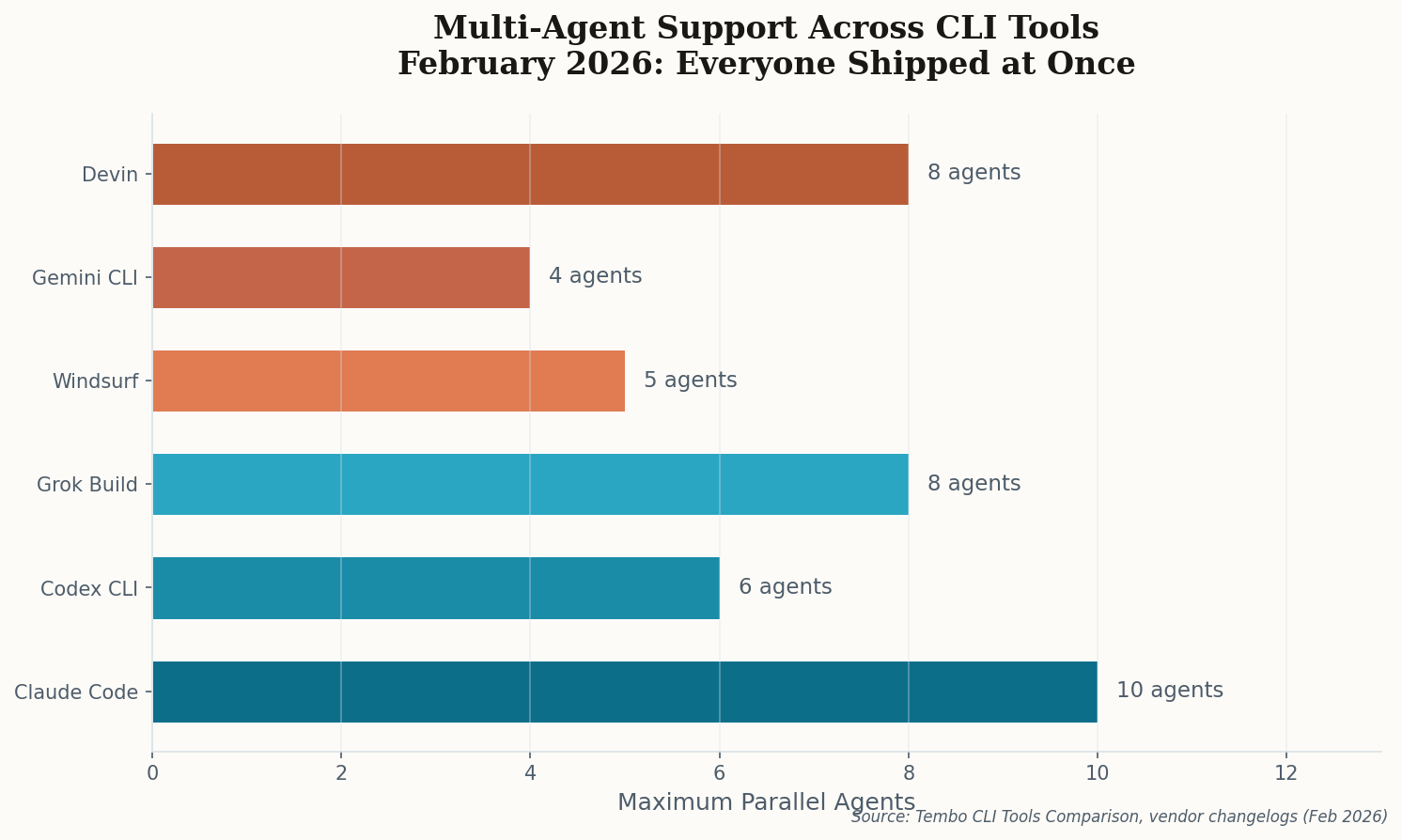
Something remarkable happened in February 2026, and if you blinked, you might have thought it was coordinated. Every major CLI coding tool shipped multi-agent support in the same two-week window. Claude Code launched Agent Teams. Codex CLI integrated the Agents SDK. Grok Build went live with 8 parallel agents. Windsurf hit 5. Even Devin shipped parallel sessions.

Horizontal bar chart comparing maximum parallel agents across 6 CLI tools: Claude Code (10), Grok Build (8), Devin (8), Codex CLI (6), Windsurf (5), Gemini CLI (4)
Maximum parallel agent capacity by tool. The range spans 4 to 10, but the real story is that zero tools ship without multi-agent in March 2026.

The implications are immediate: single-agent CLI tools are now incomplete products. Running multiple AI agents simultaneously on different parts of a codebase isn't a power-user feature anymore -- it's table stakes. A Tembo comparison guide put it bluntly: "Running multiple agents simultaneously on different parts of a codebase is now table stakes."

What matters here isn't any single tool's implementation. It's the industry consensus. When every major player independently arrives at the same feature in the same fortnight, you're not looking at a trend. You're looking at an inflection point. The era of "one AI assistant, one task" is over. We've entered the era of AI teams.

A futuristic arena where two AI agents face off as geometric holographic figures with code floating between them
04

xAI Enters the Ring with a Literal Arena

When xAI announced Grok Build, most people expected another Claude Code clone. Instead, they shipped something genuinely novel: Arena Mode. The concept is beautifully simple -- pit multiple agents against each other on the same task and compare the outputs before committing anything.

Think about that workflow for a moment. You describe a feature. Grok spawns up to 8 parallel agents, each taking a different approach. You review the results side by side, pick the best implementation (or cherry-pick from multiple), and commit. It's A/B testing for code generation, and it solves one of the fundamental problems with AI-assisted development: how do you know the first answer was the best answer?

The technical stack is interesting too. Grok Build uses a websocket-based architecture with an npm-installed CLI that connects on localhost. It has built-in GitHub integration and a local-first approach, with remote coding agents planned for later. The fact that xAI -- a company primarily known for a chatbot -- shipped a serious developer tool with a novel workflow pattern says something about how competitive this space has become.

Arena Mode might become the standard way developers evaluate AI-generated code. Instead of "generate and review," the workflow becomes "generate, compete, and select." That's a fundamentally different relationship between developer and AI.

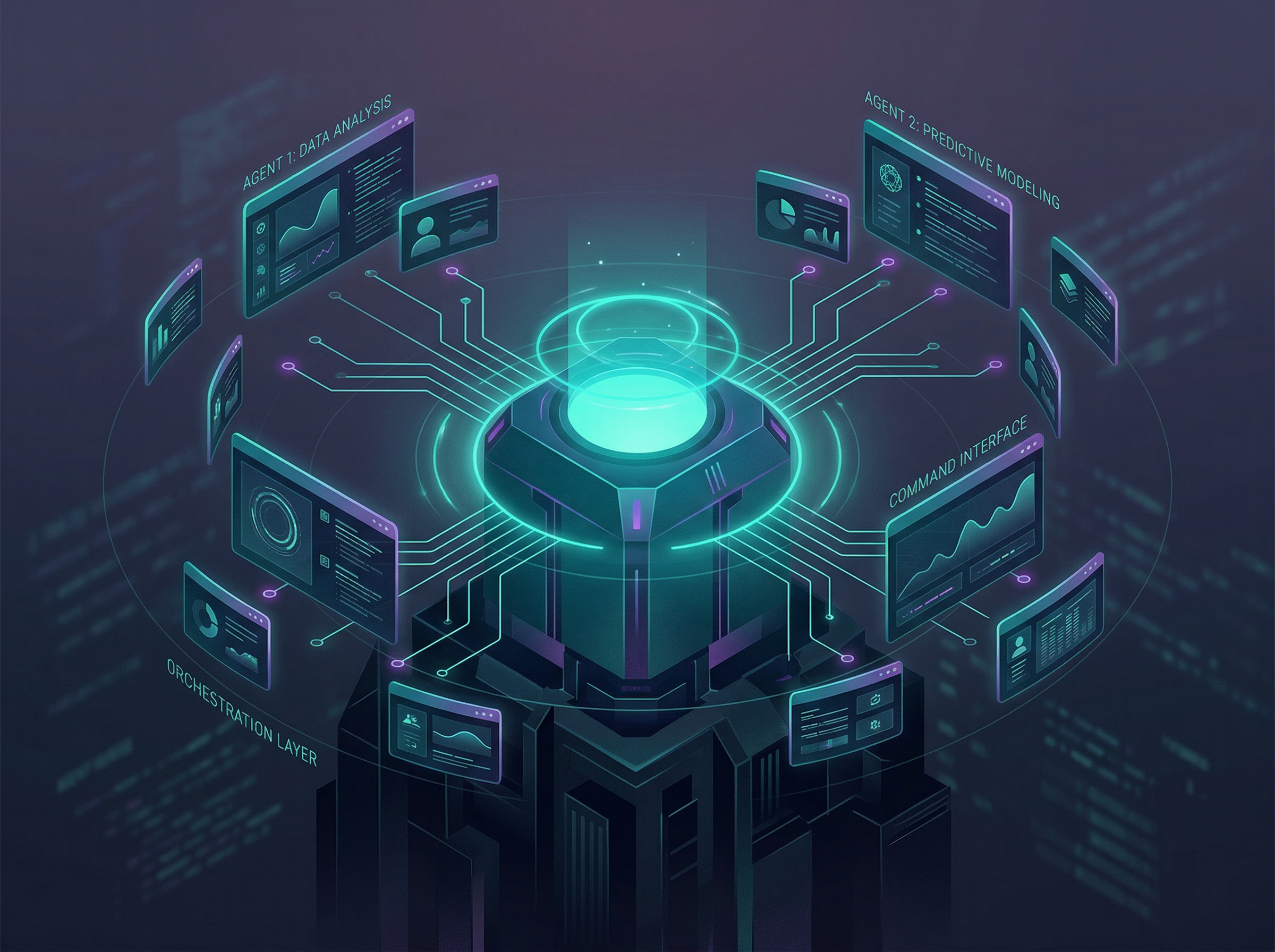
A sleek command center terminal orchestrating multiple floating agent windows connected by circuit-like lines
05

Warp Bets You'll Want One Terminal to Rule Them All

While everyone else was building yet another AI coding agent, Warp made a different bet entirely. Warp 2.0 isn't a coding agent. It's the terminal that runs all the other coding agents.

The pitch: you're already using Claude Code for some things, Codex CLI for others, maybe Gemini CLI for research. Why not run them all in the same interface? Warp's built-in Oz agent has Full Terminal Use (it can run interactive commands) and Computer Use (it verifies changes visually). But the real power play is that Oz orchestrates the other agents -- it can launch Claude Code, Codex, and Gemini CLI within the same session, managing complex multi-repo changes across all of them.

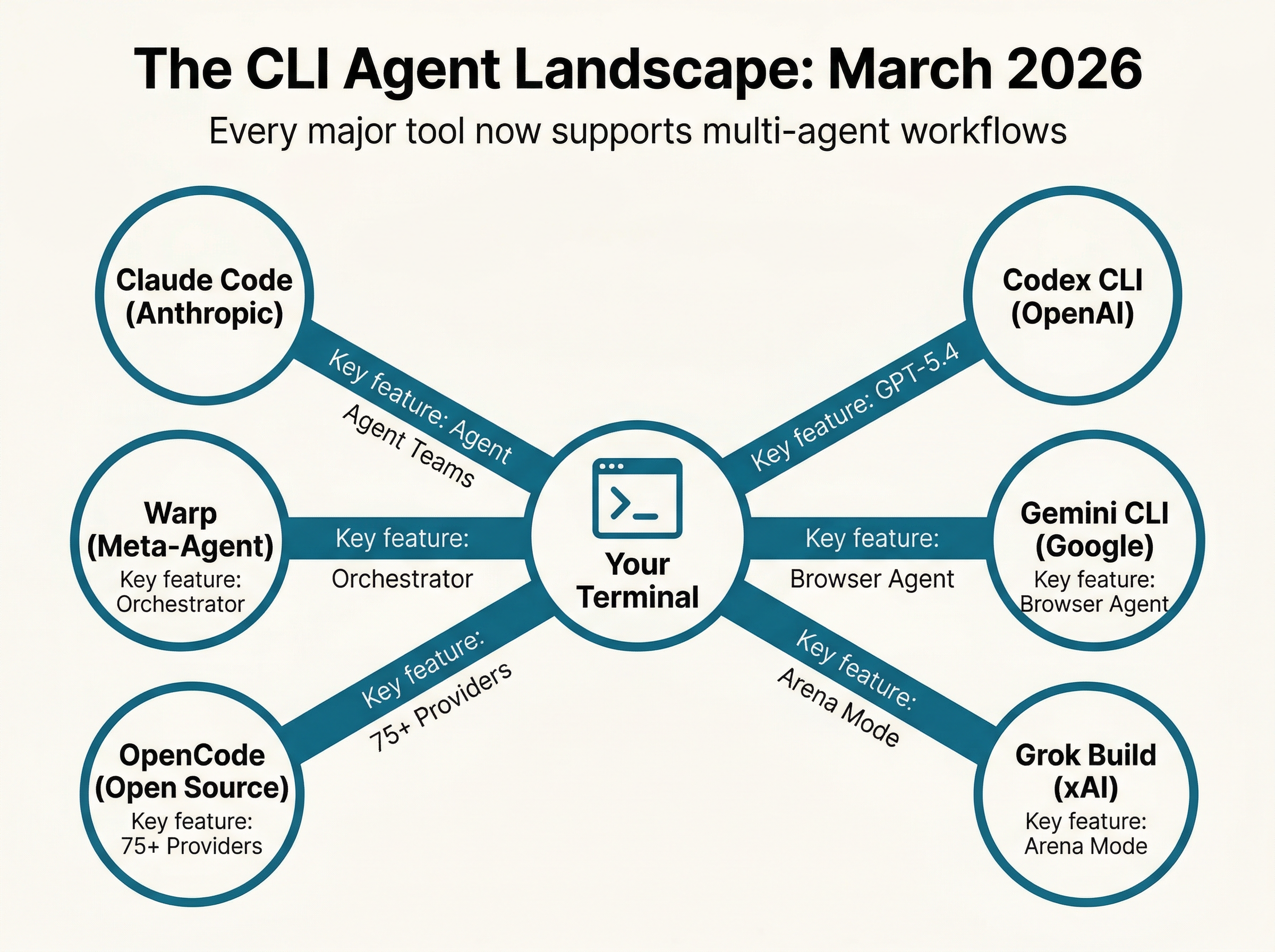
Infographic showing the CLI agent landscape in March 2026, with the terminal at the center connected to six major tools: Claude Code, Codex CLI, Gemini CLI, Grok Build, OpenCode, and Warp
The CLI Agent Landscape, March 2026 — Your terminal is now the orchestration layer for an ecosystem of competing AI coding agents. Generated with Nano Banana 2.0

This "meta-agent" pattern could become dominant. As developers increasingly use 2-3 AI tools for different strengths (Claude for architecture, GPT for quick fixes, Gemini for research), the orchestration layer that manages them all becomes the most valuable piece. Warp is betting it can be that layer.

The wildcard: Oz CLI enables running Cloud Agents from anywhere -- terminals, scripts, automated systems, services. If Warp nails the API, it becomes the middleware layer for AI-assisted CI/CD pipelines. That's a much bigger market than individual developer terminals.

An open source symbol made of interconnected glowing nodes with 100K stars raining down like digital confetti
06

100,000 Stars Say Open Source Still Wins

While the big players compete on multi-agent features and model partnerships, OpenCode quietly hit 100,000 GitHub stars and 2.5 million monthly active developers. The Go-based open-source CLI now supports 75+ LLM providers -- including local models via Ollama -- and doesn't store a single byte of your code or context data.

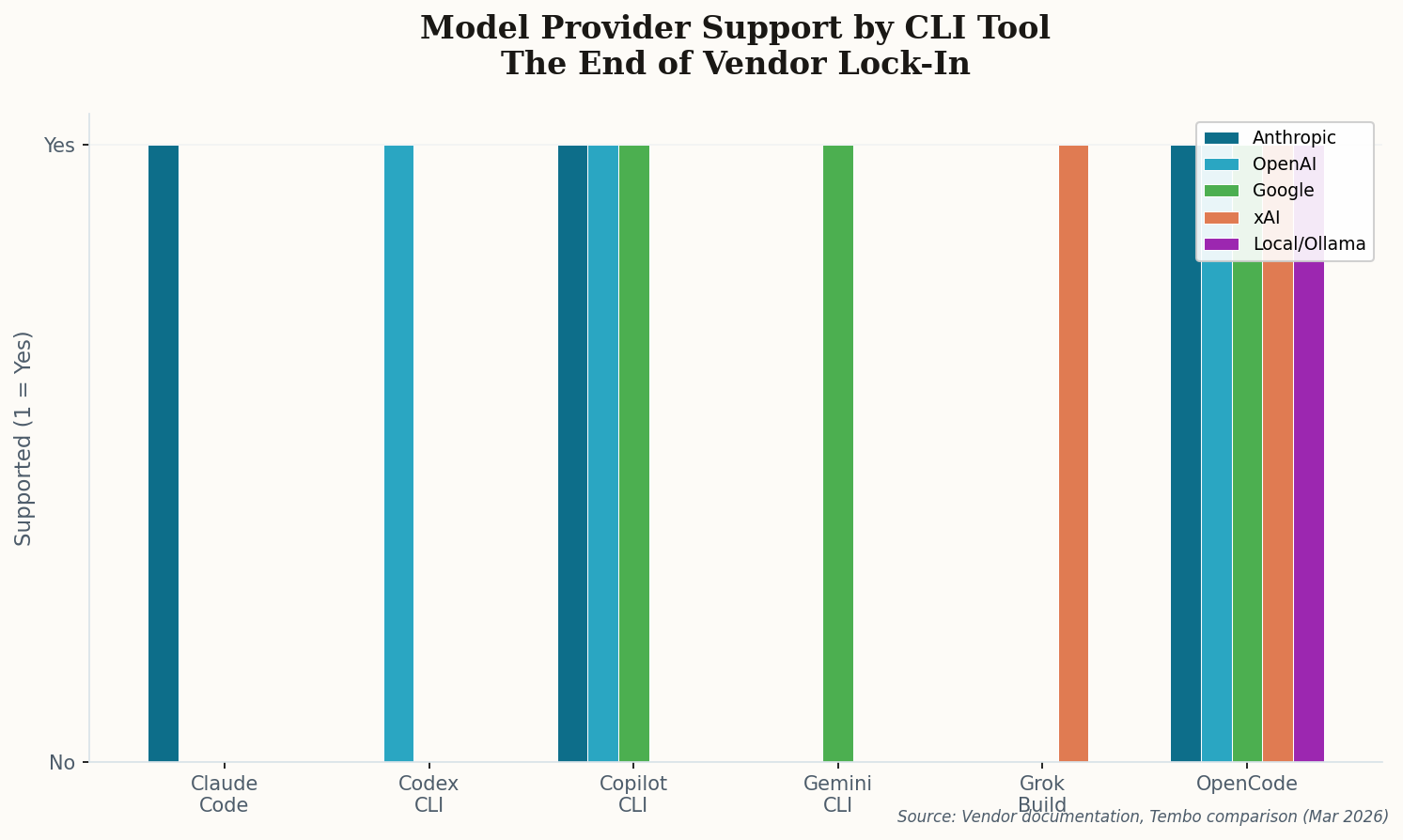
Bar chart showing model provider support across CLI tools, with OpenCode supporting all 5 provider families while most tools support only 1-2
Model provider support by CLI tool. OpenCode's 75+ provider support stands in stark contrast to the 1-2 provider model of most commercial tools. Vendor lock-in is effectively over.

Those numbers matter. With 700 contributors and 9,000+ commits, OpenCode has the community velocity that commercial tools can't match. It ships a native TUI, multi-session support, and LSP integration for real code intelligence. It's also available as a desktop app and VS Code/Cursor extension, but the CLI remains the flagship.

The privacy angle is the sleeper feature. Enterprises running sensitive codebases can't always pipe their code through third-party APIs. OpenCode running against local models via Ollama means air-gapped development environments get AI assistance too. As the commercial tools add telemetry and cloud features, OpenCode's "your code stays on your machine" positioning gets more attractive, not less.

100K stars is the community's way of saying: we want choice, we want privacy, and we want to own our tools. The commercial players should be paying attention.

The CLI Renaissance Is Just Getting Started

Two years ago, the terminal was where you ran git commit and npm install. Today it's where you orchestrate teams of AI agents building features across multiple repositories simultaneously. The trajectory is clear: the tools that win will be the ones that treat the terminal as a first-class development environment, not a fallback for when the IDE isn't enough. Multi-agent is table stakes. Model choice is universal. The next battleground? Whoever builds the best orchestration layer for the agent swarm. Keep your terminal open -- it's only going to get more interesting.