Half the Industry Thinks AI Art Will Hurt Them. They Might Be Right.
The numbers don't lie, and they're uncomfortable. The Game Developers Conference 2026 survey found that 52% of game developers believe generative AI will negatively affect their work. Among art and design professionals specifically, 64% reported fears of job displacement and reduced freelance rates. This isn't speculative anxiety—it's the majority position of people who make games for a living.
What makes this particularly pointed for the pixel art community is the "AI slop" phenomenon. Developers report that even hand-crafted pixel art now gets accused of being AI-generated, creating a perverse dynamic where the mere existence of good AI tools degrades trust in human work. Some indie devs have started posting timelapse videos of their art process as proof of humanity—a tax on creativity that didn't exist two years ago.
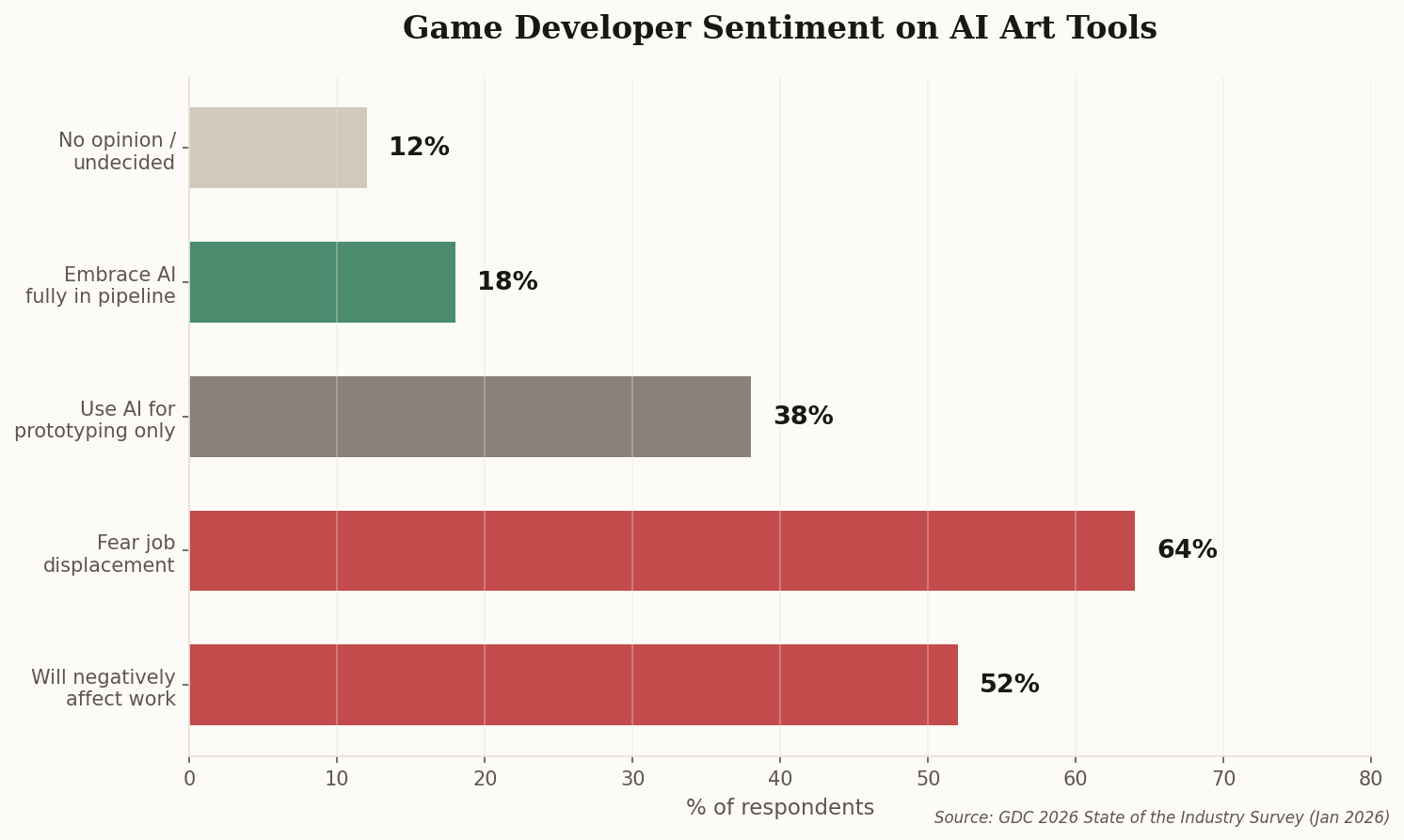
The divide isn't clean. Plenty of solo developers quietly use AI tools for prototyping while publicly distancing themselves from them. The tension isn't really about whether AI can make decent sprites—it obviously can—but about what it means for the craft economy that grew up around pixel art's renaissance. When a tool can produce in seconds what took a skilled artist hours, the question isn't technological. It's economic.