
AI Video Production

The Twelve-Second Wall

Veo 3's multi-segment video generation is evolving fast—but coherent long-form content still demands a filmmaker's discipline. Here's what the community has learned.

Listen
Film segments connected by digital light trails representing multi-segment video generation
JSON code blocks transforming into cinematic camera movements
01

When Code Becomes Camera

Natural language prompts give you vibes. JSON gives you shots. That's the discovery emerging from SuperPrompt's developer community, who've cracked a surprising technique: structured data formats yield dramatically more predictable camera behavior than prose descriptions.

The secret lies in treating cinematographic parameters as instructions rather than suggestions. A prompt like "slow dolly with rack focus" might give you something approximating that movement—or might not. But {"movement": "dolly_in", "speed": "slow", "focus": "rack_focus_background"} forces the model to parse discrete, unambiguous commands. Think of it less like asking a cinematographer and more like programming a motion control rig.

This matters for multi-segment work where shot-to-shot consistency is everything. If your first scene establishes a 50mm-equivalent field of view with a slow push, you need that exact vocabulary available for scene five. JSON isn't elegant, but it's reproducible. Professional filmmakers are finding that the twenty minutes spent learning the key vocabulary saves hours of regeneration later.

The technique also unlocks camera movements that natural language struggles to describe: "Dutch angle at 15 degrees, hold for 2 seconds, then level over 1.5 seconds." Try describing that precisely in English.
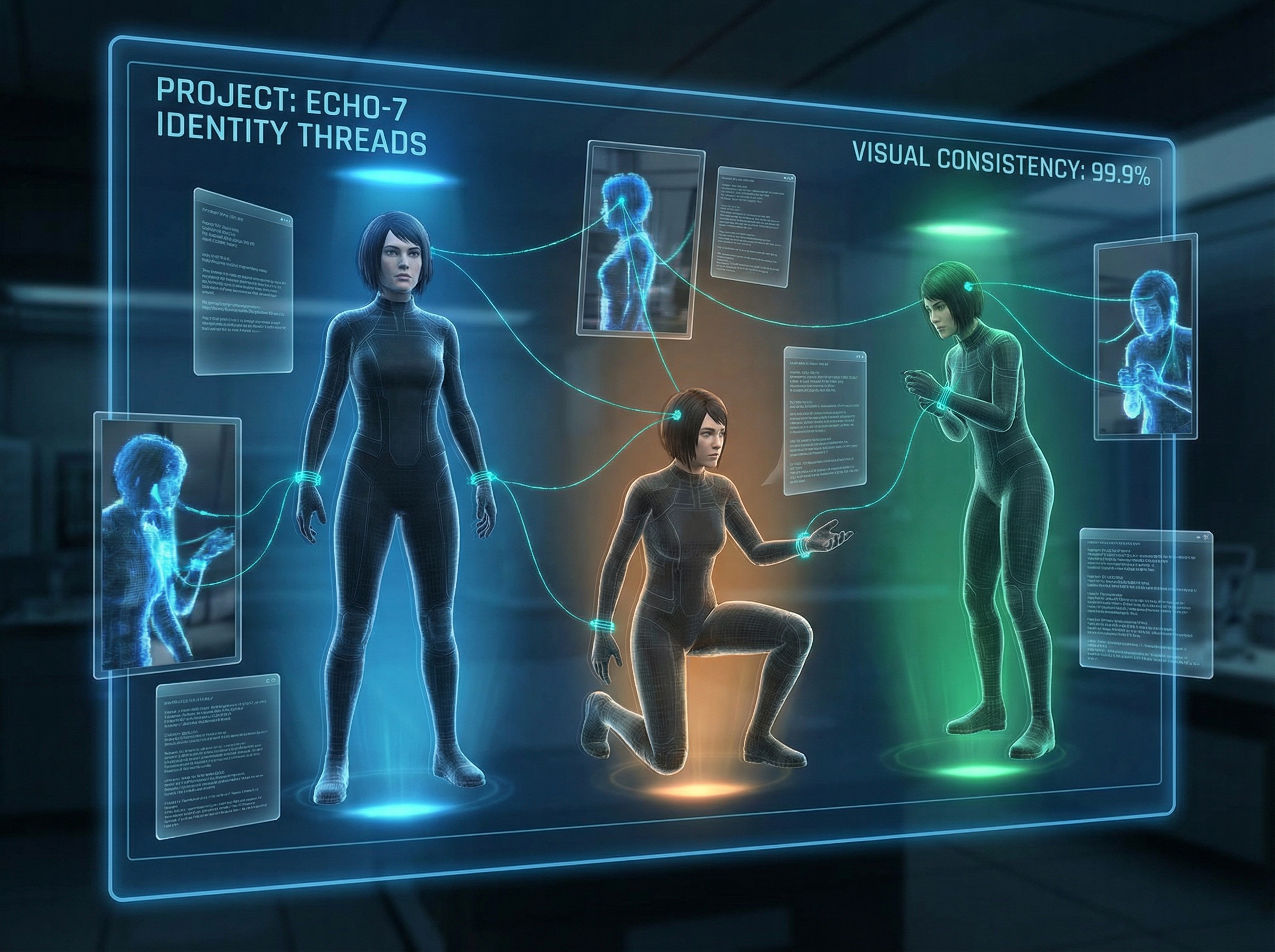
Multiple consistent character poses connected by identity threads
02

The Verbatim Rule: Copy, Don't Paraphrase

Character drift is the silent killer of AI-generated narratives. Your protagonist starts as a grizzled detective in a trench coat. By shot seven, they're somehow thirty years younger with different bone structure. The Skywork community has landed on a brutally simple fix: the Verbatim Rule.

The discipline is almost religious: if your character description says "a grizzled detective in a trench coat, mid-50s, salt-and-pepper stubble, hawk-like nose, wearing wire-rimmed glasses," that exact string must appear in every single prompt. No synonyms. No paraphrasing. No trusting the model to "remember." Copy-paste is your friend.

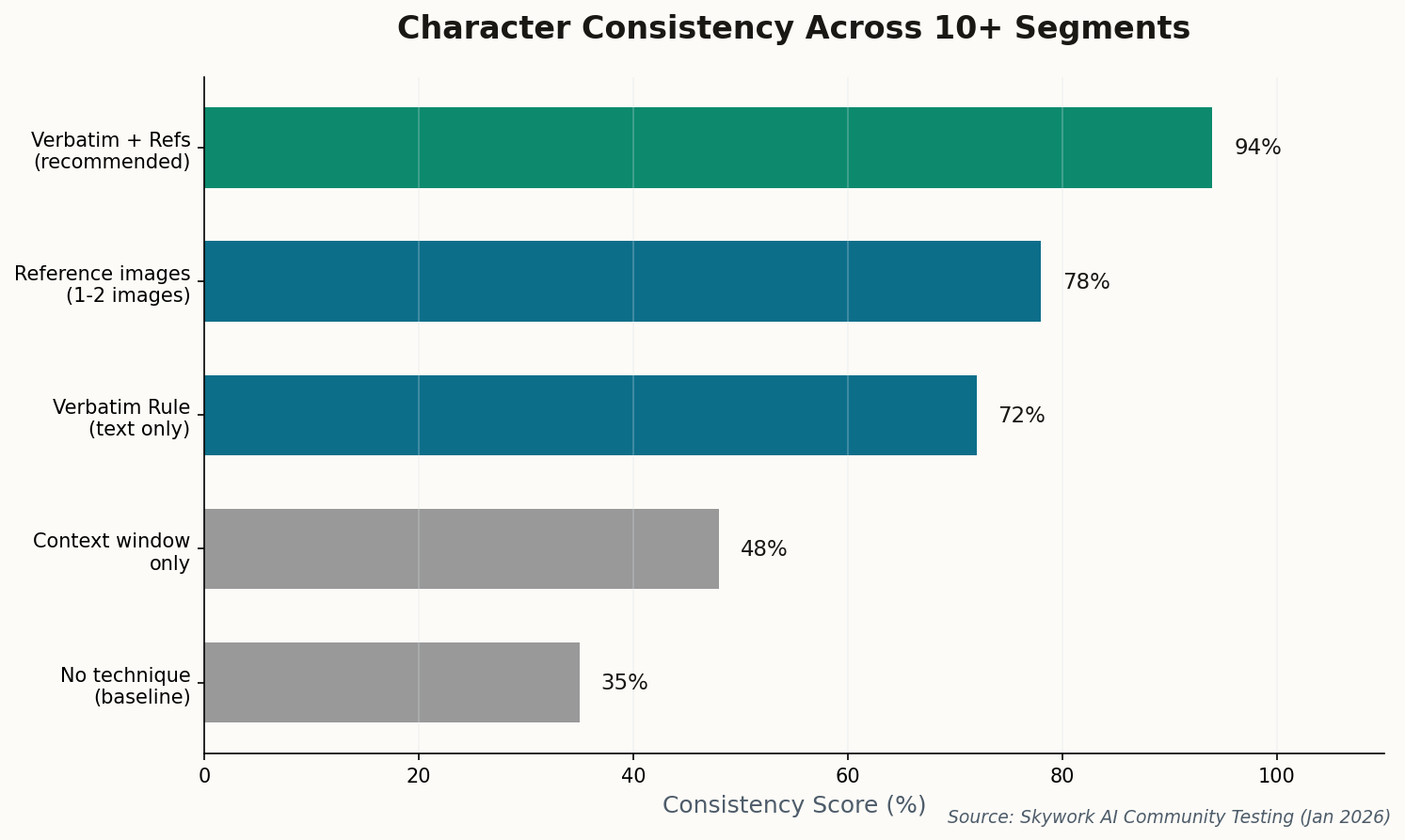
Bar chart showing character consistency scores for different techniques
Character consistency scores across 10+ segments. The Verbatim Rule combined with 2-3 reference images achieves 94% consistency—nearly triple the baseline.

Combine this with 2-3 reference images (neutral lighting, diverse angles), and you're looking at 94% consistency across a 10-segment sequence. That's not perfect—but it's workable. The community has learned that the context window alone cannot be trusted. Explicit repetition isn't elegant, but it works.

The deeper lesson: AI video models are still fundamentally stateless. Each generation is a fresh roll of the dice. Your prompting discipline is the only memory they have.

Hidden watermark revealing itself under digital authentication light
03

The Invisible Signature

DeepMind has rolled out mandatory SynthID watermarking for all Veo 3.1 output. Every frame now carries an imperceptible digital signature—invisible to viewers, readable by verification tools. This isn't about limiting creators; it's about building trust infrastructure for a world where seeing no longer means believing.

The technical achievement is impressive: watermarks survive compression, resizing, even partial cropping. But the more interesting development is the updated usage guidelines distinguishing "creative" from "deceptive" applications. Commercial users now have clear guardrails—and verification tools available directly in the Gemini app to check content authenticity.

For multi-segment workflows, SynthID applies per-frame, meaning stitched sequences maintain provenance throughout. The question now becomes cultural rather than technical: will platforms require verification? Will audiences demand it? The infrastructure exists. Adoption is the next frontier.

"Trust is the currency of the future media landscape," DeepMind's announcement reads. They're not wrong—but they're also not the only ones minting that currency.

Storyboard panels being assembled by robotic arms into a coherent narrative
04

Extend vs. Jump: The Grammar of Segments

Google Vids has finally documented the core vocabulary for multi-segment work, and it comes down to two operations: Extend and Jump. Understanding when to use each is the difference between a coherent sequence and a disjointed slideshow.

Extend continues the action seamlessly—a character walking through a door, the camera following. The model attempts to maintain momentum, lighting, and spatial relationships. It's your tool for fluid motion within a scene. Jump cuts to a new angle while preserving subject consistency—same character, new perspective. Use it when you need coverage: wide shot, medium shot, close-up.

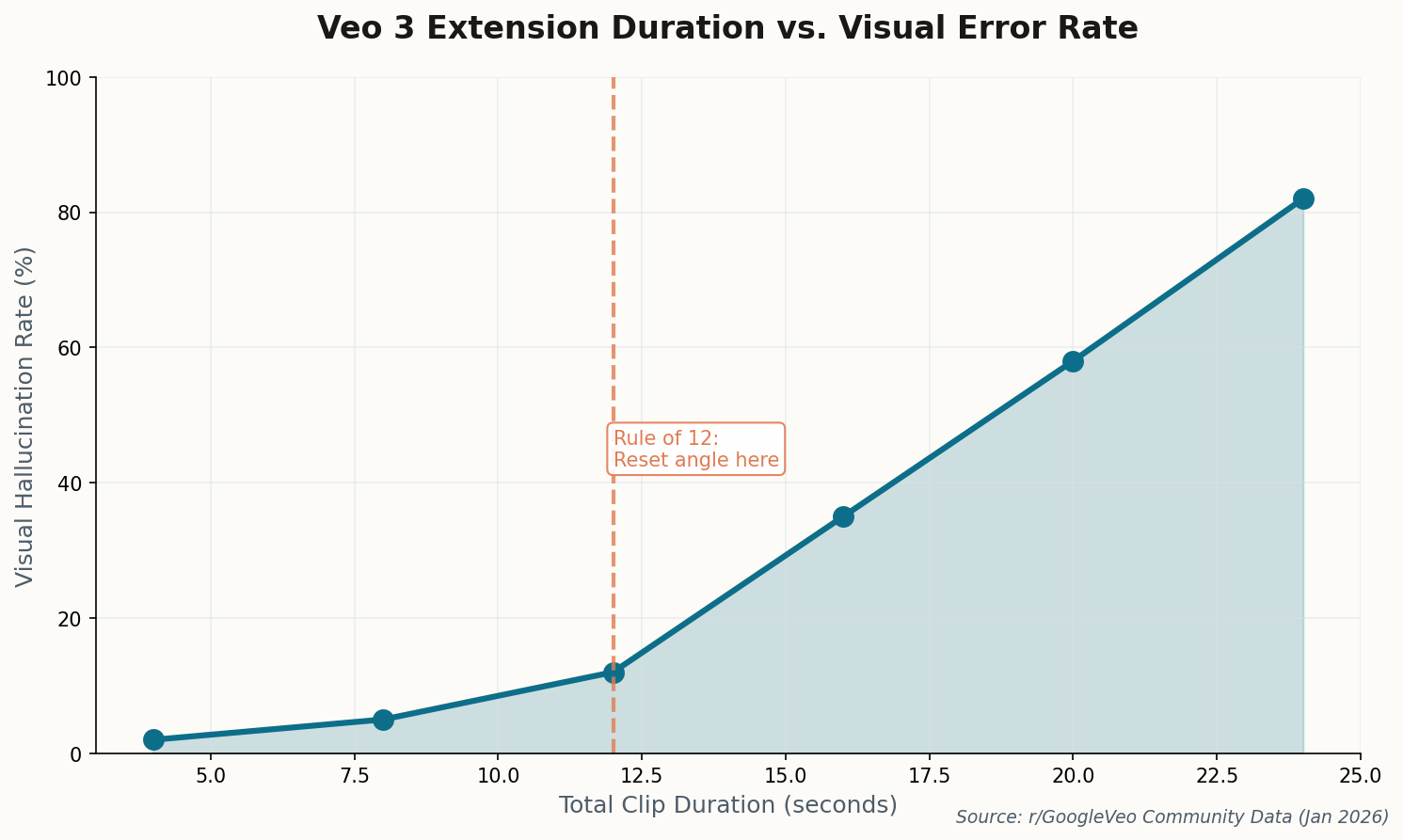
Line chart showing visual error rate increasing sharply after 12 seconds of continuous extension
The "Rule of 12": Visual hallucination rate climbs exponentially beyond 12 seconds of continuous extension. Cut to a new angle to reset error accumulation.

The community has discovered a critical limitation: error accumulates with each extension. After approximately 12 seconds of continuous generation (the "Rule of 12"), physics starts breaking down—objects drift, proportions shift, lighting becomes inconsistent. The fix is architectural: plan your shots to never exceed 12 seconds before cutting to a Jump. Think of it as a hard constraint, like a dolly track length in physical production.

This grammar changes how you storyboard. Instead of "continuous take," think "coverage pattern with natural cut points."

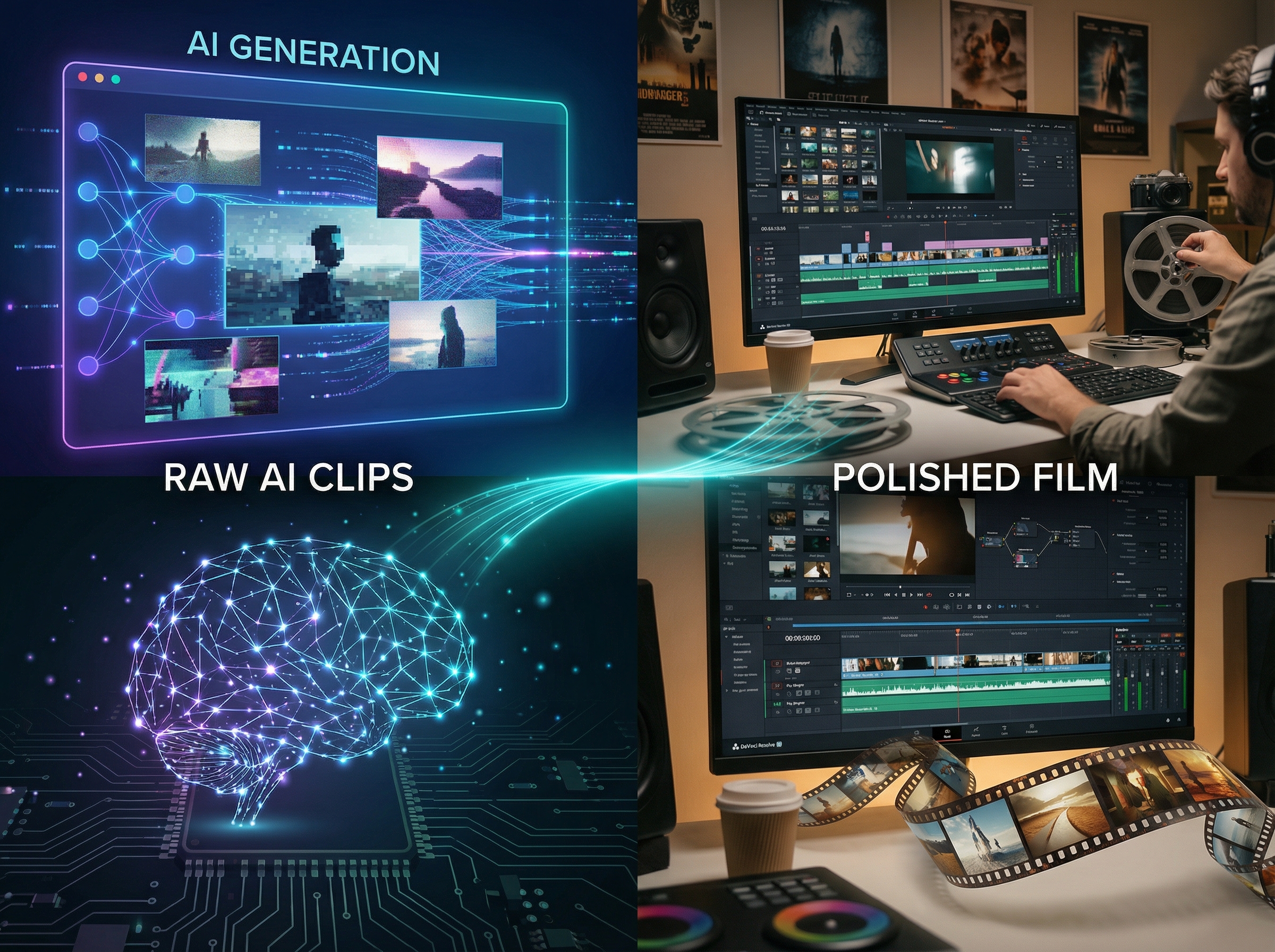
Split view of AI generation and human editing working in collaboration
05

Don't Ask Veo to Edit

The most successful Veo 3 productions share a philosophy: treat the AI as your camera department, not your post house. A viral YouTube tutorial crystallized the approach: "Don't ask Veo to edit. Ask it to shoot. You are the editor."

The workflow that's emerging treats Veo 3 as a "Shot Engine"—generating raw 4-8 second clips that get assembled in traditional NLEs like DaVinci Resolve or Premiere Pro. External upscaling if you're credit-conscious. Human pacing and timing. The AI provides coverage; the filmmaker provides rhythm.

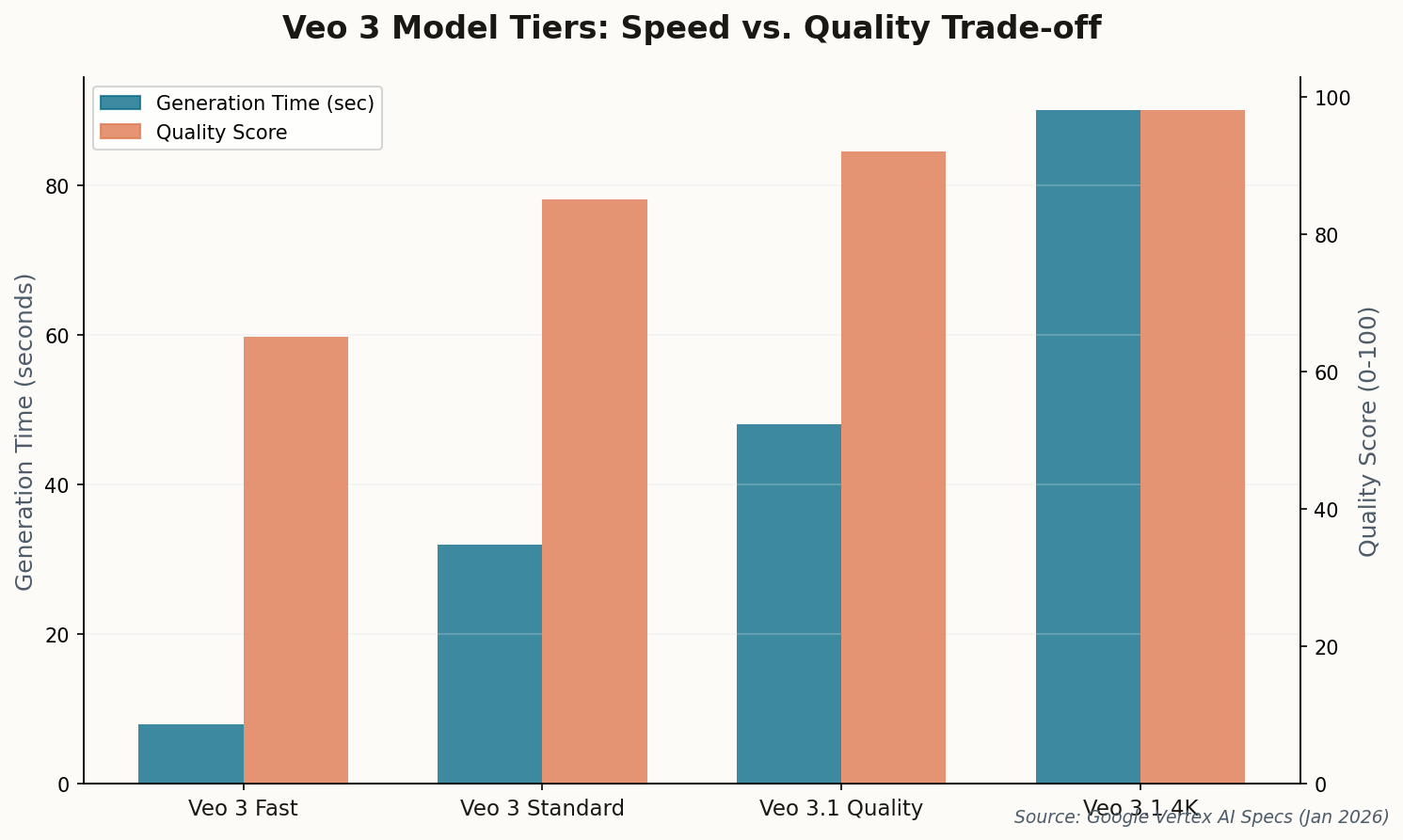
Bar chart comparing generation time and quality scores across Veo 3 model tiers
The Speed-Quality trade-off across Veo 3 tiers. Fast mode for storyboarding; Quality/4K modes for final render.

This hybrid model acknowledges what AI can and can't do right now. It can generate stunning individual shots with unprecedented control. It cannot yet understand dramatic timing, emotional beats, or the difference between a scene that breathes and one that rushes. That remains human territory—perhaps the last bastion of the editor's craft.

The practical implication: generate more than you need. Veo 3 Fast mode (4x speed, lower resolution) enables rapid iteration. Find your shots in Fast, then commit credits to Quality renders only for the selects that survive the edit.

4K resolution display materializing with holographic aspect ratio rectangles
06

From Prototype to Production

Veo 3.1's headline features—native 4K upscaling and 9:16 vertical format—might seem incremental. They're not. They mark the moment AI video crosses from "demo reel material" to "actually deliverable." Until now, every Veo output required external upscaling and cropping for platform-specific formats. No longer.

Google's announcement also highlighted improved "prompt adherence" for physics and light interactions—the soft details that separate synthetic from photorealistic. Early tests suggest shadows now fall consistently across extended sequences, and reflections maintain spatial accuracy through camera movements. These aren't glamorous improvements, but they're the ones that make or break professional use.

The vertical format support is particularly telling. YouTube Shorts, TikTok, Reels—these platforms drive more engagement than traditional horizontal video for many creators. Native 9:16 generation without cropping loss means AI-generated content can now compete natively in the attention economy's dominant format.

The message is clear: Veo 3.1 is no longer a research preview. It's a production tool. The question now is whether creative workflows can adapt to match its capabilities.

The Pattern Emerges

Every breakthrough in AI video seems to come with an equal measure of discipline required to use it well. Longer generations demand stricter prompting. Better quality demands clearer creative vision. The tools are maturing—and so must the filmmakers who wield them. The twelve-second wall isn't a limitation to resent. It's a creative constraint to master.